
Codex
GUI chatTerminal TUI
Runs the local codex CLI and boots codex app-server when a thread starts.
Local · native · keyboard-first
Verde runs Codex, Claude Code, OpenCode, Cursor, Pi, FX, and Grok Build as native chat or terminal TUI panes, with Amp as a terminal TUI in the same native desktop app. Tile or Niri-style scroll chat, terminal, and browser panes with vim keybinds. No hosted relay — Verde just talks to the CLIs already on your machine.
curl -fsSL https://verdeai.dev/install.sh | shLinux and macOS · Windows installer below · latest GitHub release
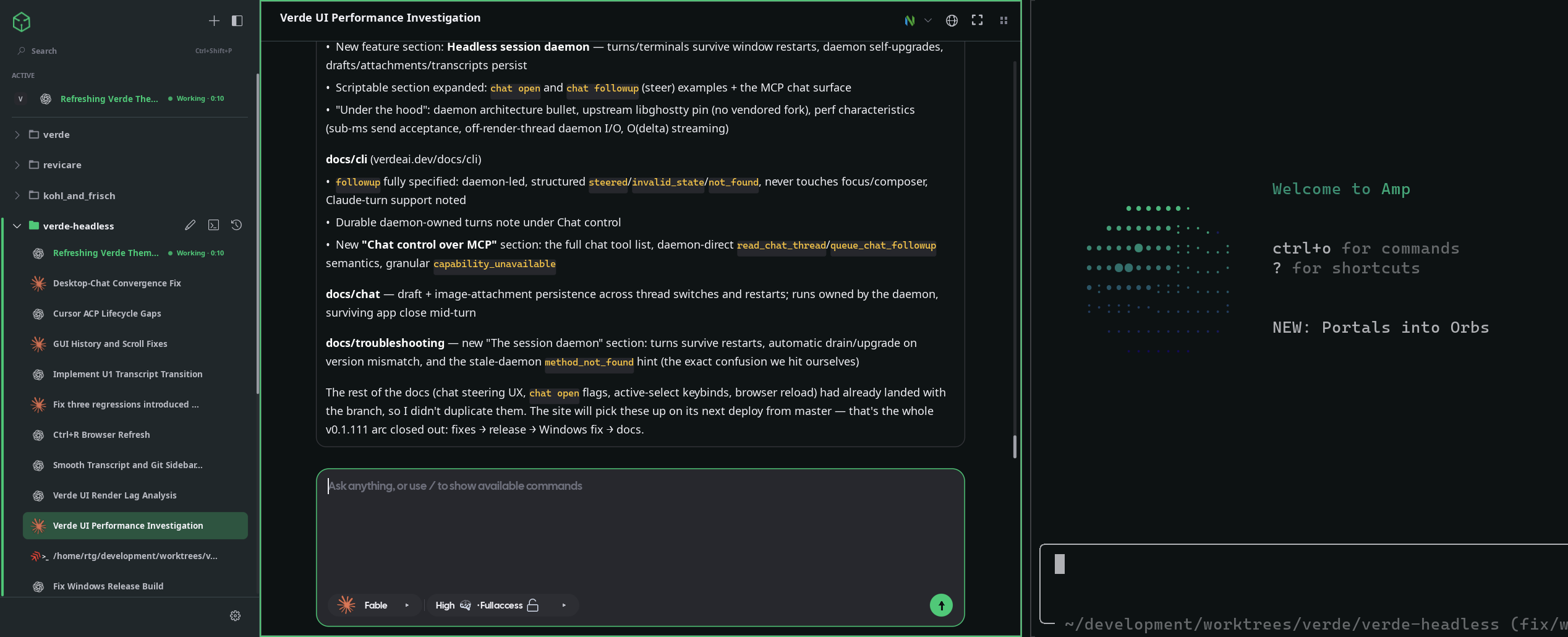
Coding agents, one workspace — GUI chat or native TUI
Runs the local codex CLI and boots codex app-server when a thread starts.

Talks to your installed Claude Code through the Claude Agent SDK.

Drives the opencode CLI and starts opencode serve on demand.

Speaks to the Cursor CLI ACP server (agent acp) on your machine.

Drives the pi CLI in RPC mode (pi --mode rpc) for native chat, and also launches its terminal TUI.

Speaks ACP to the fx CLI (fx acp) for native chat, and also launches its terminal TUI.

Speaks ACP to the grok CLI (grok agent stdio), and also launches its terminal TUI.

Launches the amp CLI in an embedded terminal, with hooks that drive live status pips.
Codex, Claude Code, OpenCode, Cursor, Pi, FX, and Grok Build can run inside an embedded Ghostty terminal pane or drive Verde's native chat panes. Amp is a terminal TUI. Either way, Verde doesn't host a model or run inference — it drives the provider CLIs already installed on your machine, so your tokens, transcripts, and project files never leave it.
Tiling workspace
Every pane is a first-class window. Split chat, browser, and terminal side by side — or let Verde scroll them as a Niri-style strip when the workspace fills up. Same vim keybinds either way.
Automatic, always-on, or disabled per workspace. Free-form wheel panning, resizable columns, sidebar reorder, and layouts that persist across launches.
Command palette
One Raycast-style launcher ranks your threads, open panes, workspaces, and app commands in a single list. Search past chats by title, hop to any pane, or fire an action without leaving the keyboard.
Ctrl+Enter opens a thread in a fresh pane. Slash commands like /stack and /process run straight from the composer alongside each provider's own commands.
Portable themes
On Omarchy, Verde auto-detects the active theme's colors.toml with no config needed. On any platform, pick a palette below and import it from this site. Every shot is the real app recaptured under that theme, and this page re-skins itself from the same colors.
verde theme import https://verdeai.dev/themes/verde.jsonImports, activates, and adds it to the Settings theme dropdown.These URLs are ordinary, versioned JSON files, so they also work with verde theme validate and automation. Verde still follows ~/.local/state/omarchy/current/theme/colors.toml automatically. See Configuration & state for the detection order and manual overrides.
Everything in one window
The pieces a coding session actually needs — a browser, a terminal, your long-running processes, and every agent — without a browser tab or a second app in sight.
When a workspace grows past a couple of panes, switch to a horizontal or vertical strip — free-form panning, resizable columns, sidebar reorder, and per-workspace overrides.
Tile a native webview beside your agent, then point at an element or draw a region and send the visual context directly to a chat or terminal TUI.
A Ghostty-powered terminal under every workspace. Spawn shell tabs or agent launch-profile tabs, with OSC titles and per-terminal zoom that persist.
Declare your dev server, build watcher, or queue worker once. Start, stop, restart, and inspect them from chat with /stack and /process.
No hosted inference, no proxy, no telemetry sink. Verde talks to the CLIs already on your machine; tokens, transcripts, and files stay put.
Import portable theme packages on Linux, macOS, or Windows, or let Verde follow your active Omarchy colors.toml automatically.
Keyboard-first
Verde is driven the way you drive your editor and window manager — splits, focus, resize, and zoom all have vim-style defaults, and every binding is remappable in one config file.
These are the defaults; override any of them under keybinds in your Verde config.
Scripting
Every running instance exposes current-user local IPC: a Unix socket on Linux and macOS, or a named pipe on Windows. The verde live and verde state subcommands let you inspect panes, send prompts, write to terminals, and script the app from your dotfiles, hooks, or CI.
verde live chat send --pane $PANE --prompt "run the tests and fix failures"verde live terminal write --focused --text $'cargo test\r'verde live pane split --pane $PANE --kind terminal --axis verticalverde live status --json | jq '.result.browser'Full command surface in the CLI reference
Where it fits
Verde sits where a terminal multiplexer, a hosted agent app, and an IDE plugin each stop short — a native home for every agent you already run locally.
| Verde | tmux + CLIs | Hosted agent apps | IDE extension | |
|---|---|---|---|---|
| Run several agent CLIs side by side | ✓ | ~ | – | ~ |
| Native tiling chat / terminal / browser | ✓ | ~ | – | – |
| Embedded browser pane | ✓ | – | ~ | – |
| Local-only, no hosted relay | ✓ | ✓ | – | ~ |
| Scriptable over local IPC | ✓ | ✓ | – | – |
| No Electron / Chromium bundle | ✓ | ✓ | – | – |
| Layouts that persist across launches | ✓ | ~ | ~ | – |
✓ full~ partial / with effort– not really
Under the hood
Built as a native desktop package on top of Verde's own Palette UI framework. No Electron UI, no bundled Chromium, and no telemetry sink — just the ingredients a workstation tool should be made of.
Common questions
The short version of how Verde fits into a local AI coding workflow.
Install
The installer detects your platform, downloads the matching release artifact from GitHub, and installs Verde into ~/.local, /Applications, or your Windows user profile.
curl -fsSL https://verdeai.dev/install.sh | shWindows x64 · PowerShell
irm https://verdeai.dev/install.ps1 | iexWindows installs without administrator access and creates a Start Menu shortcut. Then install and authenticate at least one provider CLI — codex login, Claude Code, opencode, agent login for Cursor, pi, fx login, grok login, or amp.